-
 play_arrow
Praise 24/7 NO Today's Best Gospel


How Deploying Peplink Routers from 5Gstore Eliminates Remote Office Downtime.
How Deploying Peplink Routers from 5Gstore Eliminates Remote Office Downtime.
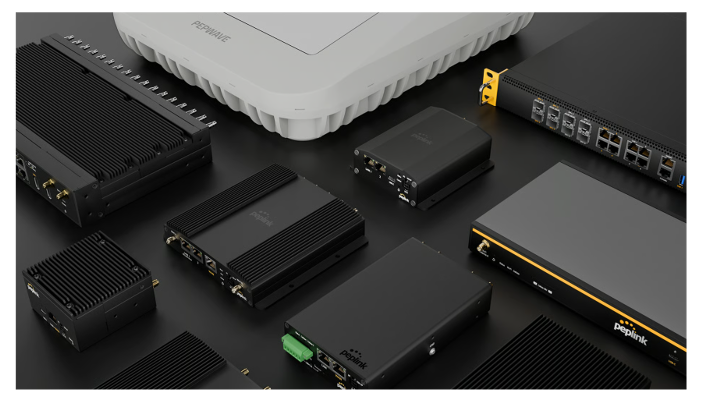
(ThyBlackMan.com) Remote offices are expected to maintain reliable internet access for cloud applications, file sharing, and video meetings. When connectivity falters, teams lose access to critical systems, client calls are missed, and productivity stalls. The frustration is immediate: no one can access shared drives, support calls drop, and deadlines slip. The underlying issue often traces back to a single weak link—the internet connection. Deploying Peplink routers, which are designed for resilience and flexible network management, can prevent these disruptions. When sourced through a trusted technology distributor, businesses gain the hardware and support needed to keep remote offices running, no matter what happens to a single network line.
Causes of Remote Office Connection Failures
Most remote office interruptions stem from reliance on a single internet provider or outdated equipment. Cable or DSL lines are vulnerable to service outages caused by construction, weather, or provider issues. Even brief disruptions carry significant consequences, as remote teams depend on uninterrupted access to cloud-based resources. Hardware failures—such as aging modems or consumer-grade routers—compound the risk, since these devices often lack features that automatically restore service when something goes wrong.
Another frequent issue is limited cellular backup. While some businesses add a mobile hotspot, these consumer devices rarely switch over automatically or provide the bandwidth needed for multiple users. As described in guidance on office network redundancy strategies, relying on manual intervention or basic backup lines leads to longer downtime and lost work hours.
Network security also suffers when equipment lacks the ability to segment guest and business traffic or enforce up-to-date encryption. This creates additional points of failure during outages, as teams scramble to restore not just connectivity but also compliance with company policies.
How Peplink Routers Ensure Continuous Connectivity
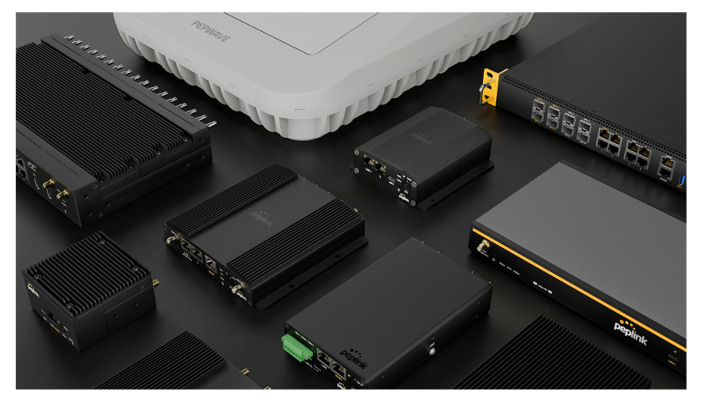
Peplink routers are engineered for environments where downtime is not an option. Each model supports features like dual SIM slots, which allow the device to switch instantly between two cellular networks if the primary connection fails. This capability is essential for remote offices located in areas with unreliable wired service or where multiple carriers provide overlapping coverage.
With built-in intelligent traffic routing, Peplink routers can balance network loads so that critical business applications always get priority bandwidth. If a cable connection drops, the router automatically reroutes data through a backup 4G or 5G link, ensuring that video calls and cloud services stay online. This level of automatic failover distinguishes business-grade routers from consumer models.
Centralized management tools allow IT teams to monitor connection status and performance remotely. As explained in remote office network monitoring practices, this visibility lets teams react quickly to potential issues—often before users even notice an interruption.
Advantages of Sourcing Hardware Through 5Gstore
Choosing the right source for Peplink routers shapes the installation, support, and long-term reliability of your remote office setup. When organizations purchase from 5Gstore, they gain access to a curated selection of Peplink models suitable for everything from small field offices to large distributed teams. This supplier also provides device compatibility information, which helps buyers match routers with the correct cellular plans and antennas for their location.
Expert guidance is available for configuring advanced features such as VPN tunneling and remote management. This support makes it easier for non-technical staff to deploy routers with settings that fit their organization’s security and bandwidth needs. Sourcing through a specialized distributor also means hardware arrives with the latest firmware and documentation, reducing the risk of setup errors or vulnerabilities.
When hardware, configuration, and support come from a single source, businesses can streamline troubleshooting and warranty claims, further minimizing the risk of extended downtime in remote offices.
Implementing MultiWAN Failover for Seamless Operations
MultiWAN failover is a key feature that enables Peplink routers to maintain continuous connectivity. By connecting the router to multiple internet sources—such as a primary wired line and a cellular modem—the device automatically detects outages on any one line and reroutes all traffic to another available path. This switchover happens in seconds, eliminating the need for manual resets or user intervention.
For remote offices with mission-critical needs, configuring MultiWAN settings allows for both load balancing (using multiple internet lines at once) and failover (switching to backup lines only when needed). Fine-tuning these rules ensures that essential services like voice calls, file syncing, and cloud logins remain active, even if one connection goes down.
Deploying this setup with 5Gstore Peplink routers gives IT administrators the flexibility to adjust policies as office needs evolve—whether scaling up bandwidth for a growing team or adding new connectivity options as they become available.
Conclusion
To ensure reliable operations in a remote office, equip each site with business-grade Peplink routers and configure automatic failover to multiple connections. By sourcing through a specialized distributor, you gain both the right hardware and the support needed to prevent unexpected downtime. Prioritize flexible, actively managed network solutions to keep your teams connected and productive, no matter what challenges arise.
Staff Writer; Paul Stewart


-

Praise 24/7 Commercial Free
For every Show page the timetable is auomatically generated from the schedule, and you can set automatic carousels of Podcasts, Articles and Charts by simply choosing a category. Curabitur id lacus felis. Sed justo mauris, auctor eget tellus nec, pellentesque varius mauris. Sed eu congue nulla, et tincidunt justo. Aliquam semper faucibus odio id varius. Suspendisse varius laoreet sodales.
close

Post comments (0)